See it in action
A minute with Irrlicht
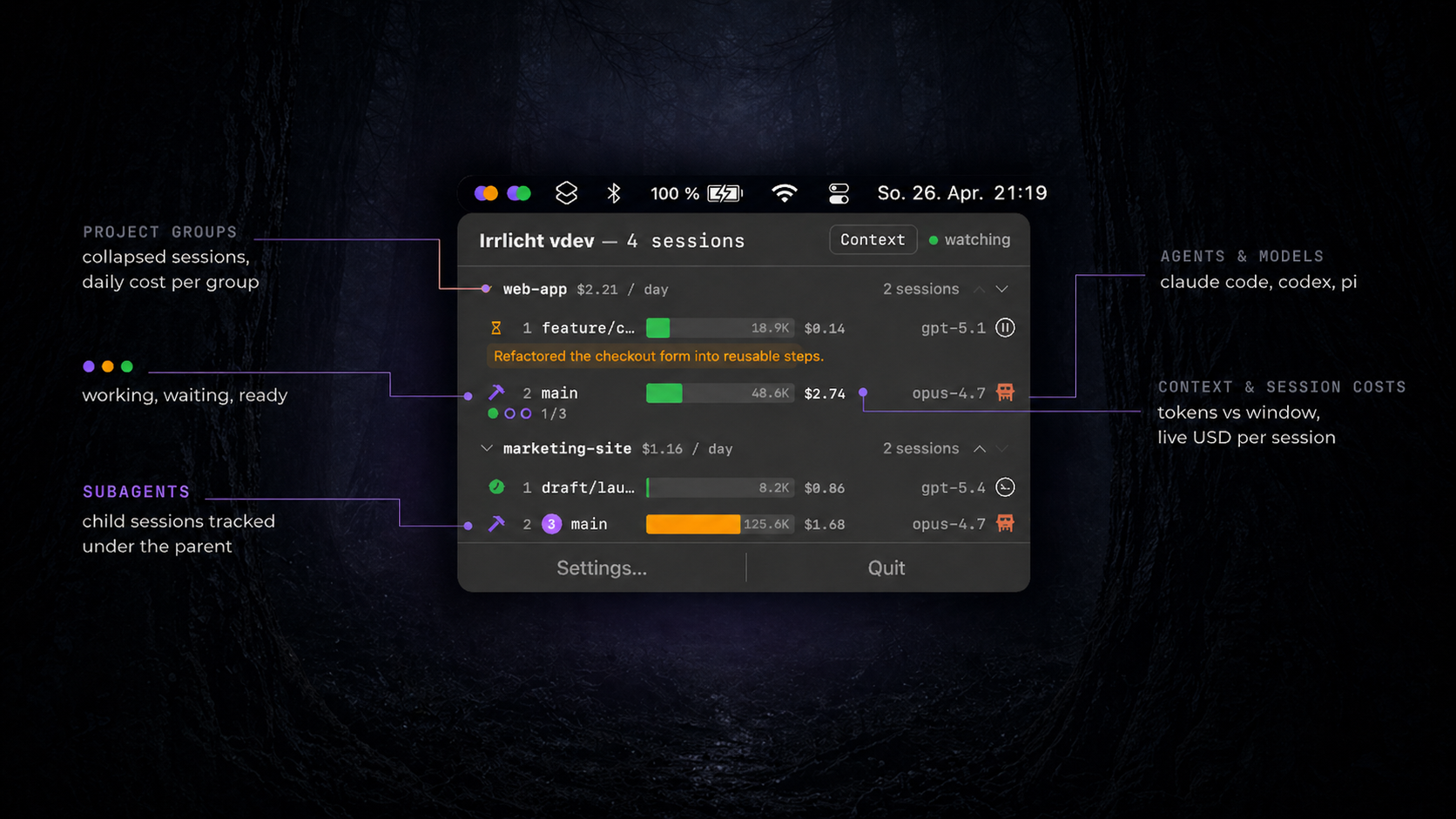
A glance at the menu bar tells you where to go next. Watch the demo for the full picture.
Menu-bar telemetry for AI coding agents
/ eer-likht / — will-o'-the-wisp
Know who's working, who's waiting, and where you're needed next — without leaving your menu bar.
curl -fsSL https://irrlicht.io/install.sh | sh
<1s latency·5 MB RAM·100% local·no telemetry
Why Irrlicht
Multiple agents. Multiple projects. Multiple vendors. All running in parallel. Irrlicht turns the chaos into one ambient dot per session — visible at a glance, clickable to jump straight back.
Watching a YouTube video, eating lunch, in a different window. You don't know when an agent is done. The menu-bar dot is the ambient hint that says your turn — without pulling you back to the terminal until it actually matters.
Six sessions across four projects and three branches — the mental map breaks fast. Click any Irrlicht dot or notification and you're back in the exact terminal window, ready to type.
ccusage and friends show one big total. Irrlicht breaks spend down by project, session, and day — so when you're paid by the project, you finally know.
Burn through Claude at noon, jump to Codex for the afternoon, back to Claude tomorrow. Notifications, layout, shortcuts stay put. The agents change — the cockpit doesn't.
Per-session context %, model, and a history of state changes show when each agent worked hardest, when waits dragged on, when context started filling. Tune your rhythm with agents — and stop hitting auto-compact by surprise.
One light per session. No ambiguity.
The agent is thinking, building, calling tools. It doesn't need you yet.
The agent needs your judgment. A question, a permission prompt, a plan to approve.
The path ahead is clear. The session is idle, ready for your next instruction.
When the session itself fails — the provider refuses the call, credentials expire, the process dies mid-turn — the light turns red instead of quietly green. The Light System has all four.
See it in action
A glance at the menu bar tells you where to go next. Watch the demo for the full picture.
Compatibility
Monitors the agents you already use, integrates with orchestrators, and runs where you need it.
Capabilities
Zero configuration. Install, run, and Irrlicht discovers your sessions automatically.
Not a token counter. Not an observability stack. No SDK wrappers, no collectors, no dashboard tab to keep open — mostly just the files your agents already write, plus a lightweight, auto-installed status hook for most of them.
Sub-second state detection via FSEvents and kqueue. See every state change the moment it happens.
Track context window utilization across models. Get notified at a threshold you set — a percentage (default 80%) or an absolute token count — before auto-compaction hits.
Per-session and per-project cost tracking based on model pricing and token breakdown. The History view adds spend over time, attribution by project, branch, and model, and a projection of where you're headed.
Claude Code, OpenAI Codex, Pi, and more. Monitors all your AI coding agents from one unified interface.
Detects branch, project name, and worktree context. Sessions grouped by project in the menu bar.
One-click setup. Install the daemon and the app — it detects your agents and shows exactly what it wants to read or install; approve once and it wires itself up.
Get Started
Open Source
MIT licensed. Contributions welcome. Read the docs, file an issue, or submit a pull request.
Origin
One agent was enough to break my focus. I wanted a small ambient light in the menu bar — named after the Irrlichter that guide Faust through Goethe's Walpurgisnacht.
It now watches dozens of agents across vendors, tracks cost per project, exposes context pressure vendors hide, and pings only when one of them actually needs you.
Read the full story →